ChatGPT Can Now Connect to Your Bank Accounts (2026 Guide)

Junior Y.
Founder, Spendify

In May 2026, OpenAI did something that turns ChatGPT from a clever chatbot into something that actually knows your money: it added a live bank connection. Through Plaid, the same secure layer most finance apps already use, paid ChatGPT users in the US can now link real accounts across roughly 12,000 financial institutions and ask questions grounded in their actual transactions.
Quick answer: Yes, ChatGPT can now connect to your bank accounts (via Plaid, read-only, paid US tiers as of mid-2026). It’s genuinely useful for analyzing your spending, but it can’t move money, and it doesn’t track your budget or debt-free date over time the way a dedicated app does. Below: what it does well, where it falls short, and how to set it up safely.
Disclosure: We make Spendify, a personal finance app with its own AI connection (an MCP server). So we’re biased. We’ll also be honest about where ChatGPT’s built-in bank connection is the better tool, and where you’ll hit its limits fast.
What ChatGPT’s bank connection actually does
When PCMag and Investopedia covered the rollout in late May 2026, the framing was consistent: this is a read feature, not an act feature. After you link an institution through Plaid, ChatGPT can:
- Summarize spending. “How much did I spend on restaurants last month?” gets a real number, not an estimate.
- Categorize transactions. It groups your charges and can spot where a category quietly crept up.
- Flag recurring charges. It’s good at surfacing the $14.99 subscription you forgot about.
- Answer one-off questions. “Did my paycheck land?” “What was that $230 charge on the 14th?”
This is a real upgrade over the old workflow of copy-pasting a bank statement into the chat. The data is live, it’s structured, and the answers are grounded in your actual numbers instead of generic advice.
If you’ve ever wanted to ask AI about your spending and get a real answer, this is the first time the major chatbots can do it natively.
What it can’t do (yet)
Here’s where the honesty matters. The bank connection is read-only and stateless, and those two facts define its limits.
It can’t move money. ChatGPT can tell you that you’re overspending on takeout; it can’t pay your credit card. OpenAI built the feature deliberately read-only, which, given how new agentic finance is, is the right call. (If you’re curious about the products that do let AI act on your money, we wrote about whether you should let an AI agent spend your money.)
It doesn’t remember. A chat is a conversation, not a system of record. Ask ChatGPT about your budget today, and tomorrow you start over. It doesn’t persistently track your spending against a budget, watch your progress, or recalculate your debt-free date when your balance changes. It answers the question in front of it and moves on.
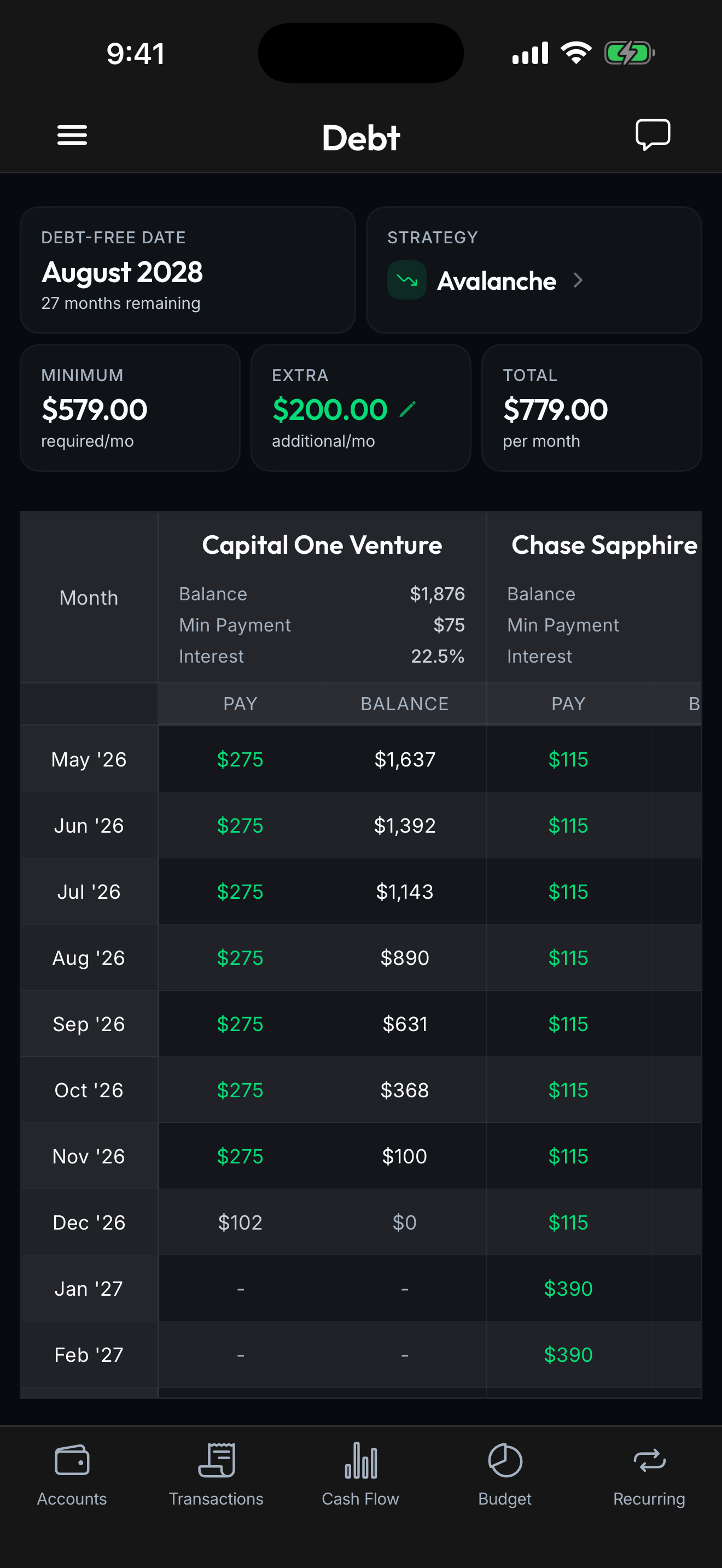
It’s not built for planning. “How much did I spend?” is a question ChatGPT answers well. “When will I be debt-free if I put an extra $200/month toward my highest-interest card?” is a planning question, and planning requires state, structure, and a model that updates over time. That’s a different kind of tool.
ChatGPT’s connection vs. a finance app’s AI connection
This is the comparison that matters, because both can now “connect AI to your bank.” They’re solving different problems.
| ChatGPT’s built-in connection | A finance app’s MCP server | |
|---|---|---|
| Access | Read-only via Plaid | Read-only, scoped to the app’s data |
| Memory | Stateless (per-conversation) | Persistent (tracks over time) |
| Best at | Ad-hoc questions, summaries | Ongoing planning, debt-free date, budgets |
| Setup | Built into ChatGPT | Connect the app’s server to your AI |
| Works with | ChatGPT (and OpenAI’s stack) | Claude, Cursor, VS Code, ChatGPT |
ChatGPT’s native connection is the fastest way to ask a question right now. A dedicated app’s connection, like connecting Claude to your accounts with Spendify’s MCP server, is the better fit when you want the AI to reason over a structured, persistent picture of your finances: a real budget, a real payoff plan, real progress tracking.
If you’re trying to decide which assistant to use in the first place, our ChatGPT vs. Claude vs. Gemini for personal finance comparison breaks down what each one is actually best at.
How to connect ChatGPT to your bank safely
If you want to try it, here’s the sane way to do it.
- Confirm you’re on a paid tier in a supported region. As of mid-2026 the feature is paid-only and US-first, expanding gradually.
- Connect through Plaid, not by pasting. Use the official in-app connection. Never paste full account numbers, routing numbers, or your SSN into a chat. Those don’t belong in conversation history.
- Start with read-only questions. Spending summaries, subscription audits, category breakdowns. That’s the sweet spot.
- Check your privacy and history settings. Decide whether you want these conversations stored, and turn off model training on your chats if that matters to you.
- Disconnect when you’re done experimenting. Plaid connections are easy to revoke. There’s no reason to leave an idle one linked.
We go deeper on the privacy tradeoffs, what’s genuinely safe, what to redact, and what never to paste, in our guide on whether it’s safe to give AI your financial data.
Where Spendify fits
ChatGPT’s bank connection is great for asking. Spendify is built for planning. We connect to your real accounts through Plaid, calculate your exact debt-free date, compare snowball vs. avalanche in real dollars, and track your progress month over month, and our MCP server hands that structured picture to Claude, Cursor, or ChatGPT so the AI reasons over a plan, not a one-off snapshot. The chatbot answers “what did I spend?”; Spendify answers “what do I do next, and when does this end?”
$4.99/month or $49.99/year. iOS, Android, and web.
See how Spendify’s MCP server connects AI to your finances → · Connect your finances to AI with MCP →
Related reading: How to ask AI about your spending · ChatGPT vs Claude vs Gemini for personal finance · Is it safe to give AI your financial data?