Switch from Copilot to Spendify
Beautiful design meets powerful debt planning. Get Copilot's ease of use plus a path to debt freedom.
7
Extra features
$49.99/yr
Spendify per year
$95/yr
Copilot per year
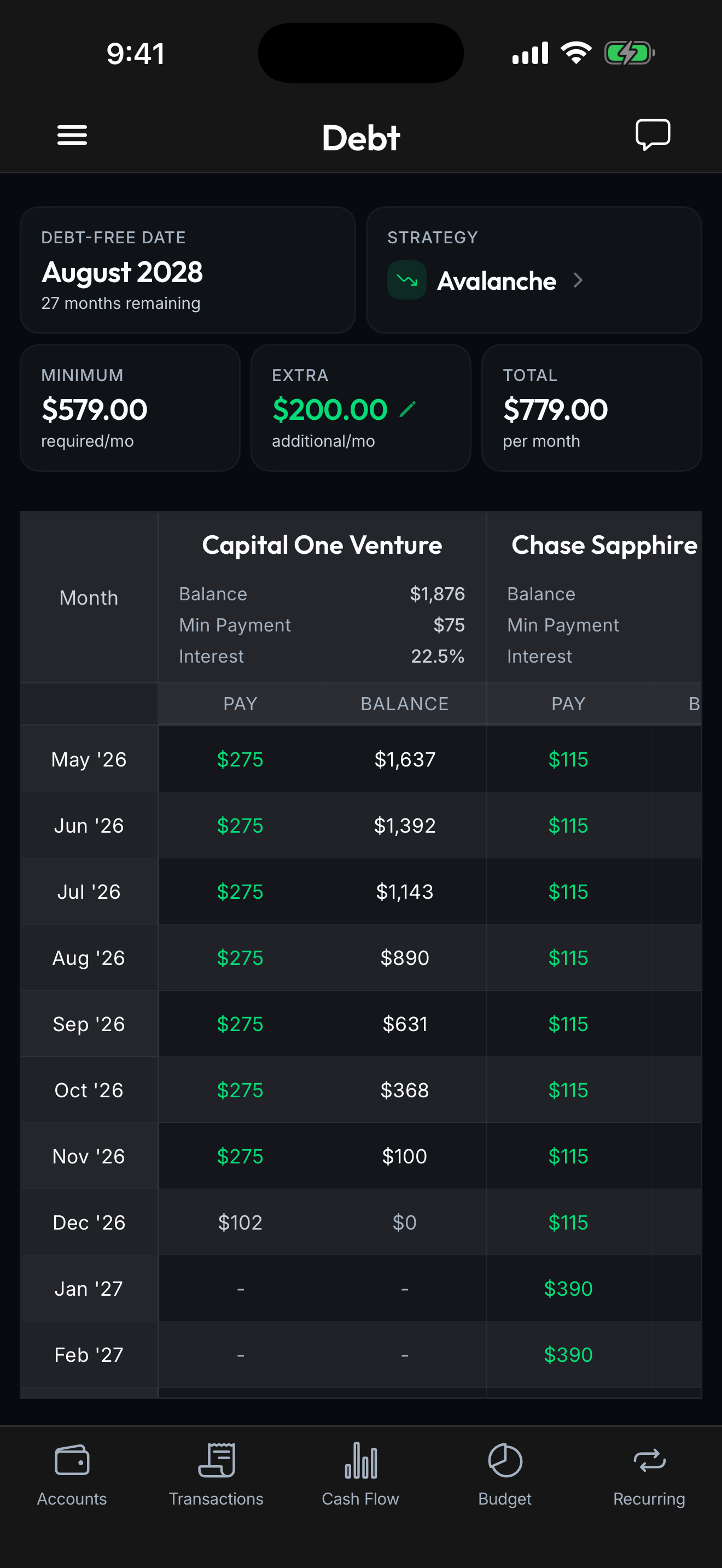
Copilot Money is known for its stunning Apple-native design and smooth UX. It's available on iPhone, iPad, Mac, and Web, but has no Android app, no collaboration features, and lacks debt payoff planning. Spendify works on iOS, Android, and the web and adds the debt tools Copilot is missing.

Spendify vs Copilot
A side-by-side look at what each app brings to the table.
Debt-Free Date Calculator
See your exact payoff date based on real balances, APRs, and your chosen strategy
No payoff timeline, shows debt balances but no projection
Strategy Comparison
Compare snowball, avalanche, and custom order side by side with interest savings
No payoff strategy tools
What-If Scenarios
See how extra payments, windfalls, or changes affect your payoff timeline instantly
No scenario modeling
AI Financial Assistant
Ask questions about your spending, get insights, and analyze trends in natural language
AI-powered spending categorization and predictive insights via Copilot Intelligence
Unlimited Workspaces
Create as many workspaces as you want: personal, household, side business, anything
Single account per subscription, no workspace concept
Workspace Collaboration
Invite anyone with role-based access: Owner, Admin, or Viewer per workspace
No multi-user collaboration
Transaction Rules Engine
Auto-categorize with multi-condition rules: match by merchant, amount, date, and more
Basic auto-categorization
Android Support
Available on iOS, Android, and the web
Apple platforms (iPhone, iPad, Mac) and Web only, no Android app
Transaction Tracking
Full tracking with auto-categorization, search, filters, and receipt attachments
Full tracking with clean categorization and search
Investment Tracking
Portfolio balances and performance monitoring
Portfolio tracking with performance and allocation
Net Worth Tracking
Complete picture across all accounts and workspaces
Net worth dashboard with historical trends
Budgeting
Flexible budgets with category limits, rollovers, and spending insights
Flexible budgets with category tracking
Feature comparison accurate as of March 2026. Features and pricing may have changed since this page was last reviewed.
Better value, more features
Everything Copilot offers, plus the debt planning tools it does not.

Spendify
$49.99/yr billed annually
Copilot
per year
Which app is right for you?
An honest look at who each app serves best.
Choose Spendify if
- Need Android support, Copilot has no Android app
- Want debt payoff planning with strategies and a projected debt-free date
- Need workspace collaboration with partners, family, or advisors
- Want AI-powered financial insights beyond basic spending summaries
Choose Copilot if
- Use Apple devices and want the most polished Apple-native UI available
- Prefer a single-user personal finance dashboard without collaboration complexity
- Value investment tracking with detailed portfolio allocation views
Why People Switch from Copilot to Spendify
Copilot Money deserves its reputation. The iOS app is genuinely beautiful: native animations, thoughtful typography, smooth transitions. If you judge a finance app purely on how it feels to scroll through, Copilot might be the best in the category. It’s also solid for investment tracking, with portfolio allocation views and performance charts that give you a clear picture of your holdings.
But design doesn’t pay off debt. Copilot shows your balances, categorizes your spending, and gives you a net worth chart, then stops. There’s no payoff timeline, no strategy comparison, no way to model what happens if you shift $300/month from savings to your highest-rate card. If you’re carrying debt across multiple accounts and need a plan, Copilot leaves you to figure it out on your own.
Debt Planning Copilot Doesn’t Have
Spendify’s debt tools fill exactly that gap. The Debt-Free Date Calculator uses your real balances and APRs to project when you’ll be done. Strategy Comparison shows you the concrete dollar difference between snowball, avalanche, and custom payoff orders, not just which method is “theoretically better,” but how much more interest you’d pay choosing one over the other with your specific debts. What-If Scenarios let you test decisions in seconds: a tax refund, a balance transfer, a side-income bump.
These aren’t features Copilot is planning to add. They’re outside its product philosophy entirely. Copilot is a financial dashboard. Spendify is a financial plan.
The Platform Problem
Copilot runs on iPhone, iPad, Mac, and Web, but there’s no Android app. If your partner uses Android, they’re out. Spendify runs on iOS, Android, and the web, which matters for any household where not everyone carries an iPhone. Combined with unlimited workspaces and role-based collaboration (Owner, Admin, Viewer), Spendify lets your whole household participate in the financial plan, not just whoever owns the right phone.
AI: Different Strengths
Copilot Intelligence uses ML to learn your spending categories and provide predictive insights tailored to your habits. Spendify’s AI Financial Assistant takes a conversational approach: ask specific questions like “How much more did I spend on groceries this month vs last?” or “What are my top 5 recurring charges?” and get instant answers. Spendify’s AI also ties into debt planning, helping you model payoff scenarios and understand interest savings.
Great Design, Greater Depth
Both apps care about design. The difference is what’s behind it. Copilot gives you a polished window into your finances with smart ML-driven insights. Spendify gives you that window plus the tools to change what you see: debt strategies, payment scenarios, and collaborative workspaces. At $49.99/yr vs Copilot’s $95/yr, the deeper feature set comes at a comparable price.
Frequently asked questions
Copilot is a beautifully designed finance app available on iPhone, iPad, Mac, and Web, but not Android. Spendify works on iOS, Android, and the web, adds debt payoff planning (debt-free date, strategy comparison, what-if scenarios), workspace collaboration, and an AI financial assistant. Copilot is $95/yr; Spendify is $49.99/yr.
Yes. Spendify is available on iOS, Android, and the web. Copilot is available on iPhone, iPad, Mac, and Web but has no Android app, which means mixed-platform households can't share a finance app with Copilot.
Copilot has earned its reputation for Apple-native polish. It's one of the best-looking finance apps on iOS. Spendify prioritizes clean, intuitive design on both platforms while going deeper on debt planning features. Design quality is subjective, but both apps take it seriously.
Spendify is $4.99/mo or $49.99/yr. Copilot is $95/yr. Both are comparably priced, but Spendify includes debt planning tools and workspace collaboration that Copilot doesn't offer. Both have AI-powered insights.
Keep comparing
More tools and guides to help you choose and get out of debt faster.
Best Apps to Pay Off Debt in 2026
8 apps ranked by payoff strategy, bank sync, and price.
Best Mint Alternatives in 2026
The top replacements ranked by use case, free and paid.
Free Debt Payoff Calculator
Compare snowball vs avalanche and see your debt-free date.
Free 50/30/20 Budget Calculator
See how much to spend on needs, wants, and savings.
Ready to Take Control
of Your Money?
Join thousands of people who stopped guessing and started planning. Your future self will thank you.