Spendify Is Now Available on the Web

Junior Y.
Founder, Spendify

Spendify Desktop is live today.
Starting today, you can open Spendify in any browser and get the full app: debt payoff planner, automatic bank sync, budgets, recurring detection, AI financial advisor. No download, no install, no extension. Just go to app.spendify.money, sign in, and you’re in.
We make Spendify, so we’re biased. We’ll also be honest about which workflows actually got better with a bigger screen and which ones still feel best on your phone. Both are true.
This is the third platform after iOS and Android, and the same account works everywhere. Connect your accounts once. Use whichever device is closest.
Everything from mobile, on the web
The web app has full feature parity with iOS and Android. Not “most features.” Not “the important ones.” All of them.
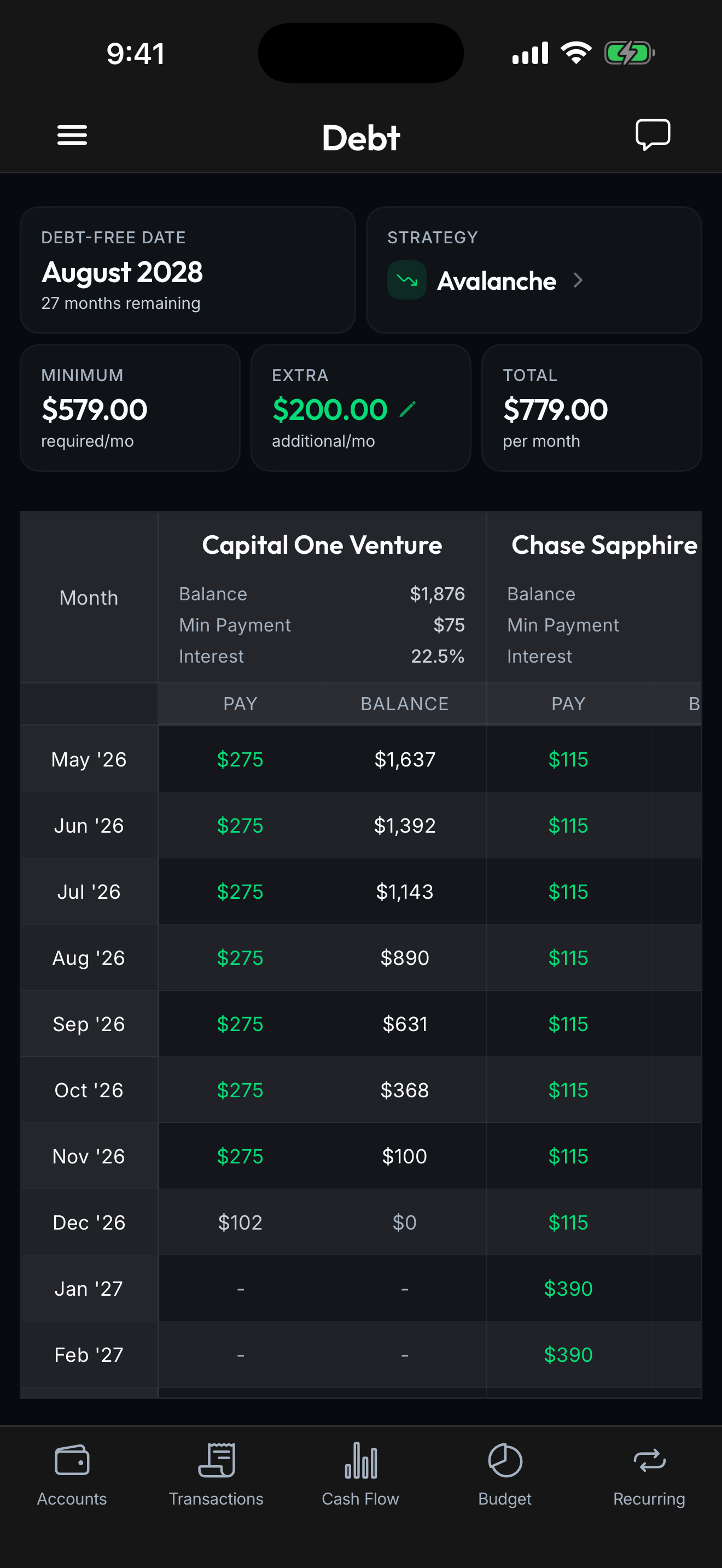
Debt payoff planner. See your exact debt-free date computed from your real balances, APRs, and payments. Compare snowball, avalanche, and custom payoff strategies side by side. Adjust your extra monthly payment and watch the timeline move in real time, the same engine as mobile, just running in your browser tab.
Automatic bank connections. Connect checking accounts, credit cards, loans, savings, and investment accounts from 13,000+ financial institutions through Plaid. Balances and transactions sync automatically the same way they do on your phone. You can connect new accounts from the web. The Plaid flow is browser-native and finishes in about 60 seconds.
Budget tracking. Set monthly limits per category and watch progress fill in throughout the month. The wider canvas is genuinely useful here: five categories on a phone needs scrolling; on the web they fit in one glance with the chart, the recurring forecast, and the day-by-day burn rate all on screen together.
Recurring detection. Spendify finds your subscriptions and recurring bills automatically. You see your true monthly cost, the one that includes the $4.99 thing from 2023 you forgot about, in one place.
AI financial advisor. Ask anything about your money in plain English. “How much did I spend on groceries last quarter?” “Which subscriptions should I cancel first?” “If I put $300/month extra against my highest-APR card, when am I debt-free?” Same conversational model as mobile, but typing on a real keyboard with a 27-inch monitor changes the kinds of questions you ask.
Workspaces and collaboration. Same Owner / Admin / Viewer roles. Same household + business + personal separation. A web tab makes it easier to share a workspace with a financial advisor or a partner over screen-share without making them install anything.
What’s actually better on the web
A web app isn’t just “the mobile app, bigger.” A few workflows became materially nicer with the extra real estate:
-
Tax prep. Open Spendify in one tab, your CPA’s portal in another, your bank in a third. Export categorized transactions to CSV. Drag receipts directly from email into the transaction they belong to. We’ve heard from a lot of customers that mobile-only tax prep is the breaking point for finance apps. The web app fixes that without giving up any of the mobile polish.
-
Annual reviews. End-of-year “where did the money go” is hard on a phone: too much context, too many small numbers. The web’s full-screen net worth chart, year-over-year category breakdowns, and side-by-side workspace comparisons make this a 20-minute session instead of an hour of squinting.
-
Multi-window debt planning. Spendify’s strategy comparison was already side-by-side on mobile, but at desktop sizes you can have the snowball plan, the avalanche plan, and your custom override open in three columns. Tweaking one and watching the other two update at the same time changes how the planner feels.
-
Keyboard shortcuts. Real keyboard shortcuts for the things you do constantly:
cto categorize,sto split,/to search,cmd+kfor the command palette. Cancelling a recurring subscription you spotted in this morning’s sync now takes one keystroke instead of three taps. -
AI conversations get longer. On a phone, you tend to ask short questions. With a real keyboard you tend to ask longer ones, and longer questions get better answers. We’ve watched our own usage shift from “how much did I spend on coffee” on mobile to “compare my discretionary spending in Q1 vs Q4 last year, broken out by week, and tell me what changed” on the web.
-
Bigger charts read differently. A debt payoff line chart at 320 pixels wide says “you’re heading down.” The same chart at 1200 pixels wide says “you crossed the halfway point on March 14th, your steepest progress was last summer when you added $200/month, and here’s the projected curve if you keep going.” Both are useful. The second one tends to land harder.
What still feels best on your phone
We’re not going to pretend the web app replaces the mobile app for everyone. A few things mobile still wins:
- Quick check-ins. The “did that charge go through yet?” 5-second look is faster on a phone you’re already holding than a browser tab you have to find.
- Push notifications. Bill reminders, budget warnings, and new-transaction alerts come through the OS notification system on iOS and Android. Web push exists but it’s not the same.
- Receipt capture. Snapping a photo of a receipt and attaching it to the matching transaction is one tap on your phone. On a desktop you have to find the file.
- Apple Card / Apple Cash / Apple Savings. Apple’s FinanceKit API is iOS-only. If your main spending lives on Apple Card, the iOS app pulls those transactions natively in a way the web (and Android) literally can’t.
Most Spendify users will probably use the web for once-a-week or once-a-month deep dives and mobile for everything in between. That’s how we use it internally.
One account. Three devices. Same data.
The point of shipping web isn’t to give you a fourth thing to learn. It’s to make sure Spendify is one app that runs anywhere you happen to be sitting.
Sign in once on the web with the email you use on mobile. Your connected banks are already there. Your budgets are already there. Your debt-free date is already there. Changes you make in the browser show up on your phone within seconds. The sync is real-time across all three platforms.
If you and your partner use a shared workspace, now one of you can be on iPhone, one on Android, and either of you can pull up the workspace on a laptop without anyone losing context. We built Spendify around households that already exist in the real world, and the real world includes laptops.
Security: same on every surface
Web doesn’t mean weaker.
- Plaid handles the bank connection. When you link a new account on the web, the Plaid Link flow opens in your browser and authenticates you directly with your bank. Spendify never sees your bank credentials, only the read-only data Plaid passes back. Same as mobile.
- Read-only by design. Spendify cannot move money. Not on mobile, not on the web. Connections are read-only. We can see balances and transactions, but we have no permission to transfer, pay, or withdraw anything.
- 256-bit AES at rest. Your data is encrypted on disk with the same key management we use for the mobile apps.
- WebAuthn for sign-in. Enable Touch ID, Face ID (on Macs with the Touch ID button), or Windows Hello to sign in without typing your password. Same biometric protection you get from unlocking the app on your phone, just on your laptop.
- No browser extensions, no fingerprinting. Spendify Desktop is a normal web app served from
app.spendify.money. It doesn’t install anything, doesn’t ask for sensor permissions, and doesn’t run third-party scripts that read your other tabs.
If you’ve been hesitant to connect your accounts to any finance app because of security, we wrote a full explainer of exactly what Plaid does and doesn’t see. The answer is the same whether you’re using Spendify on iOS, Android, or the web.
Pricing: same subscription, everywhere
This is the part people ask about first: no, the web app does not have its own subscription. There is one Spendify Pro subscription and it works on every platform you sign in on.
- $4.99/month or $49.99/year
- 7-day free trial for new subscribers
- Cancel anytime, no proration weirdness, no “web tier” / “mobile tier” split
If you already pay for Spendify on iOS or Android, you don’t pay again. Sign in on the web and the subscription is already attached to your account. If you’re new, sign up directly on the web. The signup flow takes about 90 seconds.
Get started in under a minute
- Open
app.spendify.moneyin any browser. - Sign in with email (or with Google / Apple if that’s how you set up your account on mobile).
- Your connected banks, budgets, and debt plan are already there. Start exploring.
If you’re brand new:
- Same URL.
- Tap “Sign up” instead of “Sign in.”
- Connect your first bank account through Plaid, read-only, about 60 seconds, and your first debt-free date pops up immediately.
Already on iOS or Android? Nothing changes for you. Your account works across all three platforms if you ever want to jump to a bigger screen.
Where Spendify fits
We didn’t ship the web app to replace your phone. We shipped it because real households don’t live exclusively on one device. You start a budget on your phone over coffee, you do tax prep on a laptop on a Saturday morning, you check a balance on whichever screen is closest. Spendify should be there for all of those moments, with the same plan and the same data, and now it is.
$4.99/month or $49.99/year with a 7-day free trial. iOS, Android, and the web.
See all the features → · How Spendify works in 3 steps →
Related reading: Spendify is now on Android · Why we built Spendify different · How to create a debt payoff plan · Is it safe to connect your bank to an app? · Connect finances to AI with MCP