How to Migrate from Mint to Spendify: A 15-Minute Step-by-Step Guide

Junior Y.
Founder, Spendify

You can migrate from Mint to Spendify in four steps: export your historical data from Credit Karma, sign up for Spendify, reconnect your accounts via Plaid, and set up your debt-payoff plan. The whole process takes about 15 minutes, and Spendify rebuilds up to 24 months of transaction history automatically. If you’re one of the millions of users who never felt at home on Credit Karma after Mint shut down, switching is simpler than you probably expect.
This guide walks through each step with the exact clicks, what to expect, and what Spendify does differently from Mint that matters most to former users, especially if debt payoff is why you’re leaving in the first place. For a side-by-side feature comparison, see our full Spendify vs. Mint breakdown.
Why people are leaving Mint in 2026
Intuit shut down Mint in March 2024 and migrated users to Credit Karma. The migration kept the transaction feed alive but stripped out most of what made Mint useful in the first place: custom categories didn’t carry over, bill reminders disappeared, goals were reset, and the budgeting tools were replaced with a lighter spending-summary view optimized for showing ads and credit card offers.
Two years later, the pattern is clear. Credit Karma never rebuilt the budgeting and goal-setting tools that Mint users actually cared about, and the product is increasingly tuned to push affiliate financial products rather than help you plan. We wrote more about this in Mint shut down, now what?. The short version: Credit Karma isn’t trying to be Mint, and the longer you wait to switch, the more budgeting momentum you lose.
Most people landing on this guide want one of three things: a real debt-payoff plan, budgets that actually work, or an app that isn’t ad-supported. Spendify covers all three. The product is paid, so the financial incentive is to help you save money rather than push you toward new credit cards.
What you’ll need before you start
Before you begin, have these ready:
- About 15 minutes. Most of that is waiting for Plaid to pull your transaction history.
- Bank login info for every account you want to connect (checking, savings, credit cards, loans, investment accounts).
- A list of your current debts: balances, interest rates (APRs), and minimum monthly payments. This takes the longest to gather; pull the numbers from your most recent statements or log in to each lender.
- Your phone or laptop. Spendify is available on iOS, Android, and the web, same account across all three. You can do signup and account connection from any of them.
If you don’t have the debt numbers handy, you can still complete the migration and come back to the debt plan later. Everything else can be filled in during signup.
Step 1: Export your historical data from Credit Karma
Credit Karma inherited your Mint accounts but doesn’t offer the full export Mint once did. The current option is a limited CSV download of your transaction history, available from the web app under Settings → Account → Download your data. Credit Karma periodically updates this flow, so if the path has moved, their help center has the current steps.
Is the export necessary? Technically, no. Spendify rebuilds up to 24 months of transaction history automatically from your bank via Plaid, the same source Mint pulled from originally. The export is only useful if you want a permanent archive of Mint-era data for tax records or personal history, or if any of your accounts are closed and you can’t reconnect them.
If you just want to move forward, you can skip this step entirely. Most apps require painful CSV imports. Spendify doesn’t.
Step 2: Create your Spendify account
Download Spendify from the App Store or Google Play and open the app. Signup takes about two minutes:
- Enter your email and create a password (or use Sign in with Apple).
- Verify your email.
- Set your primary goal: budgeting, debt payoff, or both. This tailors the onboarding and dashboard layout but doesn’t lock you in; you can change it later.
- Accept the 7-day free trial if you’re a new user. That covers the Mint migration and gives you a full week of access before any charge.
After year one, Spendify renews at $4.99/month or $49.99/year. No trial expiration tricks, no hidden upsells, cancel anytime from the App Store or Google Play.
Step 3: Reconnect your accounts via Plaid
This is the step that replaces every custom integration Mint used to maintain. Spendify connects to 13,000+ institutions through Plaid, the same bank-aggregation layer behind Venmo, Robinhood, and most of the fintech apps you already trust.
Here’s how it works:
- Tap Add account on the Spendify dashboard.
- Search for your bank (Chase, Bank of America, Ally, Fidelity, etc.).
- Log in to your bank through Plaid’s secure popup. You may need to approve a 2FA code, same as logging in to the bank directly.
- Select which accounts to share (checking, savings, credit cards, loans, investments).
- Wait about 30 to 60 seconds while Plaid pulls your balances and transaction history.
Repeat for every bank you want to track. Most people have 3 to 5 institutions and finish in about 10 minutes total.
A note on security: Plaid doesn’t share your bank password with Spendify. Instead, it creates a read-only access token that only allows balance and transaction reads: no transfers, no payments, no account changes. Spendify never sees your credentials. This is a real upgrade over Mint, which used a mix of OAuth and screen-scraping depending on the bank; Spendify is 100% Plaid, which means fewer broken connections and stronger security. For a full breakdown, see Spendify vs. Mint.
Step 4: Set up your debt-payoff plan
This is where Spendify does things Mint never did.
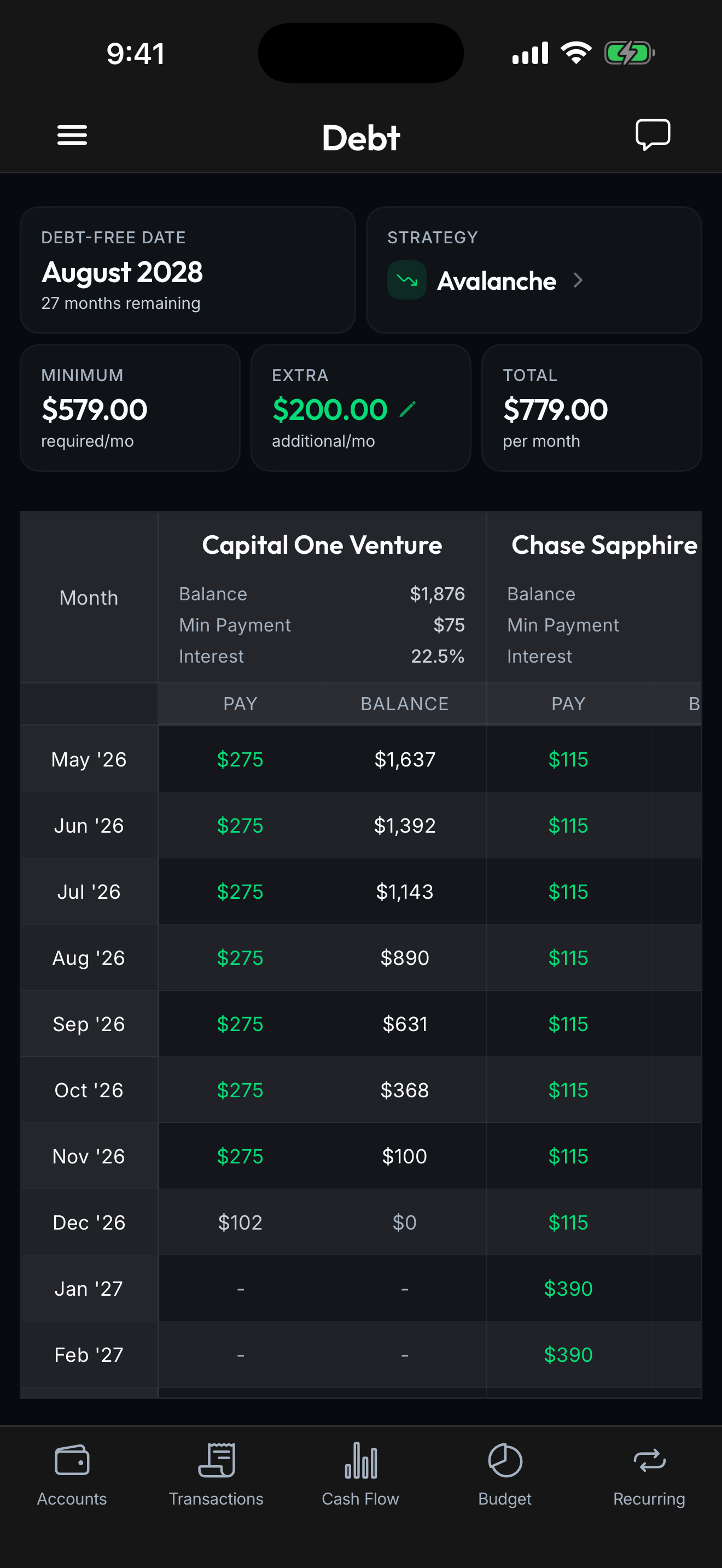
Once your credit card, student loan, and personal loan accounts are connected, open the Debt Payoff tab. Spendify will have pre-filled each debt’s balance and APR from Plaid. You add one piece of information: how much extra you can pay each month across all debts (even $50 works).
Then pick a strategy:
- Debt avalanche: pay extra on the highest-APR debt first. Mathematically optimal. You’ll see total interest paid drop by thousands.
- Debt snowball: pay extra on the smallest-balance debt first. Psychologically motivating; you get wins earlier.
If you’re not sure which to pick, our snowball vs avalanche guide walks through the math with example numbers. Once you’ve picked a strategy, our 5-step guide to building a debt payoff plan covers the implementation.
Spendify runs both simulations side-by-side so you can see the exact debt-free date and total interest cost under each approach. Users who run this calculation see an average of $530 in interest savings over the life of their debt payoff plan versus minimum-payment-only. That’s the real payoff for spending 15 minutes on a migration.
If you want to experiment before you switch, our free debt-payoff calculator runs the same math without requiring a signup. Enter your debts and extra payment, see your debt-free date, and decide from there.
Once you commit to a strategy, Spendify tracks your progress every time a payment hits your account, updates your debt-free date in real time, and sends a monthly summary showing how much interest you’ve avoided.
Spendify vs. other Mint alternatives
You have options. YNAB is excellent for strict zero-based budgeting. If you want to assign every dollar a job and don’t mind the learning curve, YNAB is the category leader. Monarch is the closest direct Mint replacement for household tracking with shared budgets and investment views. Both cost more than Spendify ($99 to $110/year) and neither has a native debt-payoff plan the way Spendify does.
Spendify is the debt-payoff-first choice. If you left Mint because you wanted a real plan for getting out of credit card debt or paying off student loans faster, not just a dashboard of past spending, Spendify is built for that. For the full comparison of every Mint alternative with pricing, feature tables, and who each app is best for, see our 8 best Mint alternatives in 2026 guide.
Ready to switch?
Fifteen minutes today saves you months of wasted budgeting drift on a product that isn’t being maintained. Download Spendify, connect your accounts, run the debt-payoff numbers, and see the exact date you’ll be debt-free. New users get a 7-day free trial. See pricing for details. which is enough runway to fully migrate, rebuild your budgets, and decide if Spendify earns your long-term renewal.
Frequently asked questions
How long does it take to migrate from Mint to Spendify?
About 15 minutes for most people. Signup takes 2 minutes, connecting your primary bank takes another 2 to 3 minutes per institution via Plaid, and setting up your debt-payoff plan takes 5 to 10 minutes depending on how many debts you’re entering. You don’t have to finish it all in one sitting. Spendify saves progress as you go, so you can connect additional accounts later.
Do I lose my transaction history when I switch?
No. Spendify pulls up to 24 months of historical transactions automatically through Plaid when you connect each account. You don’t need to export anything from Credit Karma for the history to show up. If you want a permanent archive of your old Mint data, Credit Karma’s export option downloads a CSV that you can keep for your records, but Spendify will rebuild the transaction history on its own once your accounts are linked.
Is my data safe with Spendify?
Yes. Spendify uses Plaid to connect to your banks, the same aggregation layer used by Venmo, Robinhood, and most fintech apps. Your bank credentials are never stored by Spendify; Plaid handles authentication via a read-only token. All data in transit is encrypted in TLS 1.3, and at rest with AES-256. Spendify also cannot initiate transfers or payments on your accounts. The connection is strictly read-only.
What about Mint’s budgets and categories?
Spendify automatically categorizes transactions the same way Mint did: groceries, restaurants, gas, subscriptions, and about 30 other categories out of the box. You can rename or merge categories, and any category change applies retroactively to past transactions. Budgets are rebuilt from scratch in Spendify because Mint/Credit Karma doesn’t export budget rules, but most people find the new setup takes under 5 minutes.
Can I try Spendify before committing?
Yes. Spendify’s debt-payoff calculator is free with no signup at spendify.money/calculators/debt-payoff. The app itself offers a 7-day free trial for new users so you can test every feature before being charged at the regular $4.99/month or $49.99/year rate. Cancel anytime from the App Store or Google Play.
Last updated: April 2026. This guide is educational and doesn’t constitute financial advice. Product details change. Verify current pricing and features at spendify.money before making decisions.